

Quick Launch a Performance Review for an Individual
ClayHR allows you to instantly start a performance review for an individual user using a performance review template. This imports the template's content and key settings, like consolidation options, review assignments, signatures, and automations, for a smooth and organized review.
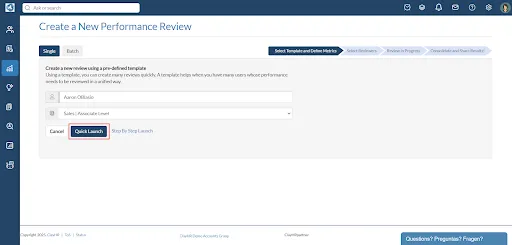
To quickly launch a performance review for an individual user:
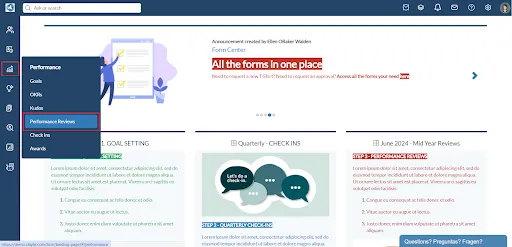
- Hover over the "Performance" icon in the left menu, then select “Performance Reviews”.
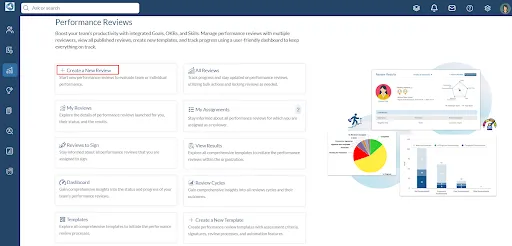
- Click on “Create a New Review”.
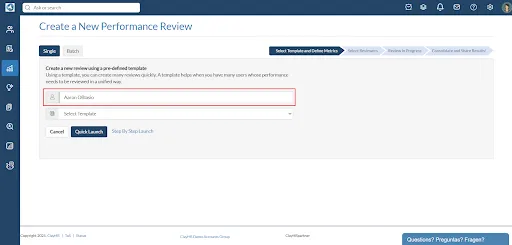
- Select the user for whom you want to launch the performance review.
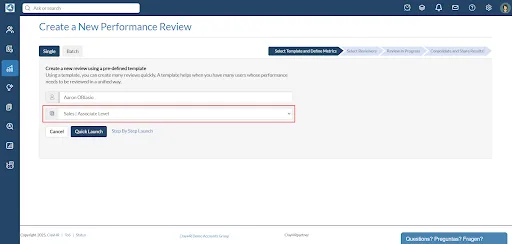
- Select the performance review template from the already defined list of performance review templates.
(Note: Selecting a Performance Review Template is mandatory for quick launch.)
- Click the “Quick Launch” button to launch the Performance Review immediately.
Follow the Getting Started with Performance Reviews page for the next steps. If you want to launch reviews in batch follow the steps on Performance Reviews in Batch & How To. To launch a review step by step, follow the steps on Step by Step Launch a Performance Review for an Individual.






.webp)
